How to Get Bank OTPs in Thailand on Your Indian SIM
A short setup guide for keeping an Indian SIM available for bank OTPs in Thailand while a travel eSIM handles affordable mobile data.

Keep your Indian SIM enabled with its operator's international roaming service active, but turn data roaming off for that line. Select a Thailand travel eSIM for mobile data and disable automatic data switching. Verify the operator requirement before leaving India and keep a backup bank login method.
The cleanest Thailand setup uses two lines for two jobs. Your Indian SIM remains switched on for bank messages. A Thailand eSIM carries Maps, Grab, WhatsApp and browsing. This prevents routine app traffic from falling onto Indian pay-as-you-go roaming.
Note: Incoming SMS, including OTPs, is free on international roaming with most Indian operators, but roaming has to be enabled before you fly and some prepaid plans need a small activation pack first.
Charges and rules vary by operator, plan type and country. Confirm in your operator's app before departure.
This is a charging summary, not an OTP guarantee. The bank, its SMS gateway and successful registration on a Thai partner network still affect delivery.
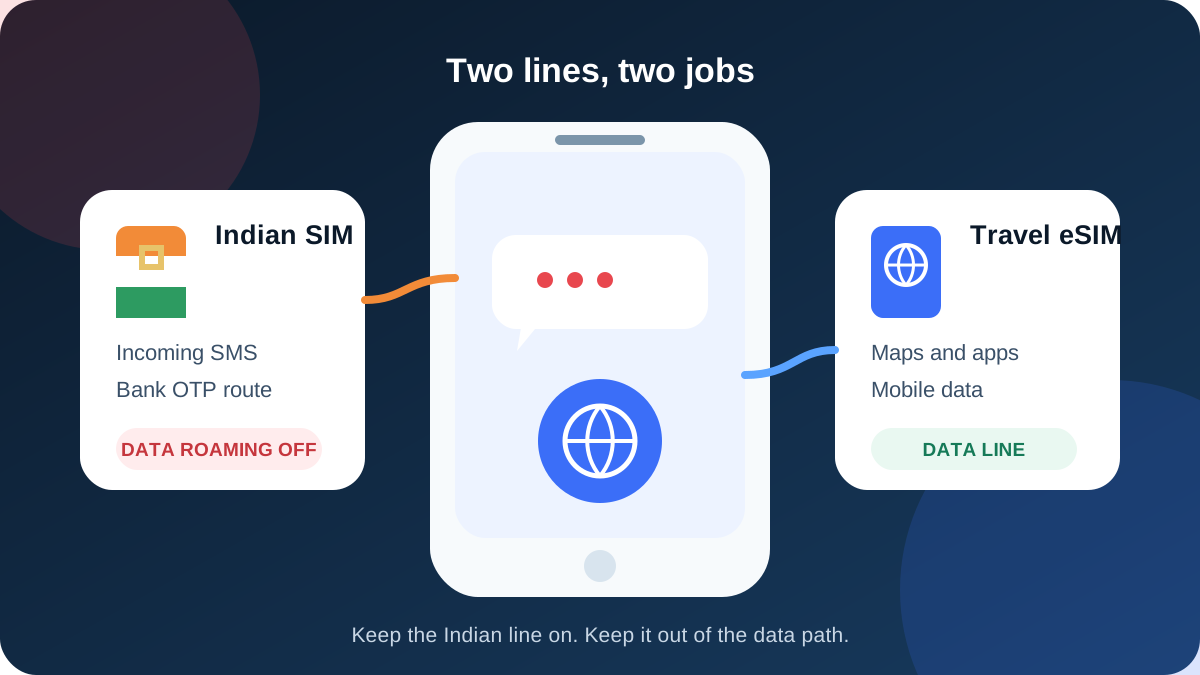
Set up both lines before India departure
- Keep ordinary validity active on the Indian line.
- Enable its international roaming service or required activation product.
- Install the TripMojo eSIM and label it
Thailand data. - Select that eSIM as the mobile-data line.
- Turn data roaming off for the Indian SIM.
- Disable automatic cellular-data switching.
- Keep the Indian line enabled for incoming SMS.
The full Indian-number OTP guide has operator-by-operator checks for Airtel, Jio, Vi and BSNL.
Which Thai network will the eSIM use
Thailand's main host networks include AIS and the True/dtac group. TripMojo sells several supplier bundles, and the exact partner can vary by bundle and availability. Check the network information shown with the purchased plan and install email rather than assuming one carrier applies to every product.
| Line | Network job | Data roaming |
|---|---|---|
| Indian SIM | Registers on its operator's supported Thai partner for SMS | Off |
| TripMojo eSIM | Connects through the bundle's local data partner | Follow the eSIM instructions |
What 10 days of data costs
Prices below were checked on 6 September 2026 and can change.
| Option | Validity and allowance | Checked price | Best for |
|---|---|---|---|
| Airtel prepaid 10-day IR example | 3 GB and 200 minutes | ₹1,198 at the time of writing | Travellers who need cellular voice on Airtel |
| TripMojo Thailand eSIM | 2 GB for 15 days | ₹479 at the time of writing | Maps, messaging and light app use |
| Airtel prepaid OTP activation | 28 days, incoming SMS, no data bundle | ₹118 at the time of writing | Keeping Airtel available while eSIM carries data |
The first two are not identical products. Airtel includes voice; the eSIM is data only. Compare what you will actually use. See live plans on the Thailand eSIM page and read the broader Airtel and Jio versus eSIM comparison.
Phone controls that prevent surprise charges
On iPhone, open Settings, Cellular, then the Indian line. Keep the line on and switch its Data Roaming off. Under Cellular Data, choose the Thailand eSIM and disable Allow Cellular Data Switching.
On Android, open SIM manager or Mobile networks. Choose the eSIM as preferred data, turn data roaming off for the Indian line, and disable automatic switching or backup data.
Avoid answering calls or sending SMS from the Indian line unless you have checked the rate. Receiving and sending are separate billing events.
If an OTP does not arrive in Thailand
Check whether the Indian line shows a Thai network. If not, confirm IR in the operator app over eSIM data, restart the phone and try the operator's listed partner manually. If ordinary SMS works but one bank OTP does not, use the bank's resend interval or backup method. Do not turn on Indian-SIM data as an SMS fix.
The short version
Keep the Indian line active for identity and the Thailand eSIM active for data. Confirm roaming before departure, disable Indian-line data and save a backup bank login route.
Data for the trip: TripMojo eSIM from ₹287, your Indian number stays on.
Frequently asked questions
Can I receive an Indian bank OTP in Thailand?
Yes, when the Indian line is valid, roaming is active and it registers on a supported network. Actual delivery still depends on the bank and SMS route.
Should Indian-SIM data roaming be on in Thailand?
No, not for incoming SMS. Keep it off when the travel eSIM supplies data.
Can the Thailand eSIM receive my bank OTP?
No. It is a data line. The OTP still goes to the Indian number registered with the bank.
Will WhatsApp keep my Indian number?
Yes. Changing the data line does not normally change WhatsApp's registered number.
Which Thai network does TripMojo use?
It depends on the purchased bundle. Check the plan and install details for the current local partner.
Is a roaming pack cheaper for a 10-day Thailand trip?
It depends on voice needs and allowance. The dated Airtel example costs more but includes voice; the cited eSIM is data only.
What if my Indian SIM shows no service?
Confirm roaming status, restart the phone and use the operator's current Thai partner list for manual selection.
Will every bank OTP arrive after setup?
No. Correct settings create a delivery path, but the bank, SMS gateway and network registration can still fail.
Sources
- Airtel International Roaming terms, checked 6 September 2026
- Jio International Services FAQs, checked 6 September 2026
- Vi International Roaming FAQs, checked 6 September 2026
- TripMojo Thailand eSIM live catalogue, checked 6 September 2026
Written and fact-checked by Tripmojo’s editorial team. Drafted with AI assistance, then reviewed by Simran Raheja before publishing.
Related articles
 Vi and BSNL International Roaming for OTPs Abroad
Current Vi prepaid and postpaid activation routes, BSNL roaming SIM requirements, dual-SIM settings, and safe troubleshooting for Indian bank OTPs abroad.
 eSIM vs Local SIM vs Roaming - What to Use Abroad
eSIM vs local SIM vs roaming compared with real 2026 prices - cost math by trip length, the bank OTP trap most guides skip, and a pre-flight setup checklist.
 Avoid International Roaming Bill Shock from an Indian SIM
Three phone settings that stop accidental Indian-SIM roaming data, plus a screenshot-ready pre-flight checklist for calls, SMS and dual-SIM travel.
 Airtel International Roaming for OTPs: ₹118 Pack Guide
What Airtel's ₹118 prepaid roaming activation does, how to buy it, and which phone settings help you receive OTPs abroad without using roaming data.
 Jio International Roaming for OTPs Abroad: 2026 Guide
Current Jio prepaid and postpaid roaming activation steps, incoming SMS rules, safe dual-SIM settings, and fixes when bank OTPs do not arrive abroad.
 Airtel and Jio Roaming Packs vs Travel eSIM in 2026
An honest 13-destination comparison for Indian travellers, showing when Airtel or Jio roaming can beat an eSIM and when separate travel data costs less.