Jio International Roaming for OTPs Abroad: 2026 Guide
Current Jio prepaid and postpaid roaming activation steps, incoming SMS rules, safe dual-SIM settings, and fixes when bank OTPs do not arrive abroad.

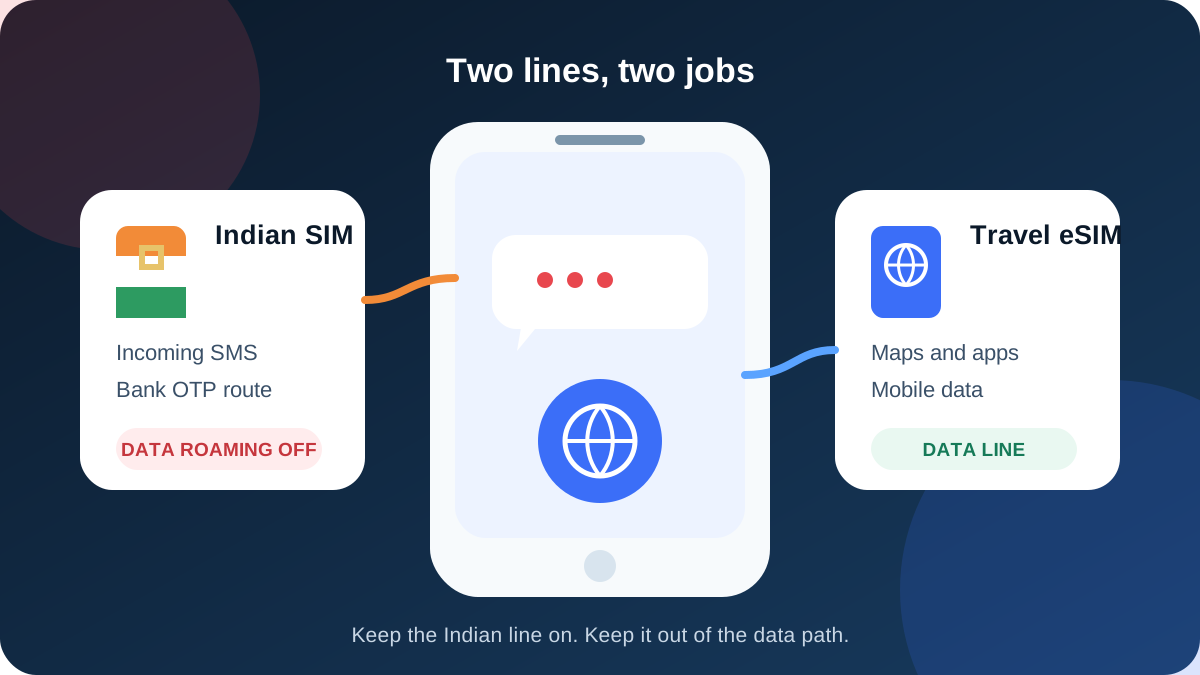
Keep the Jio line active, confirm international roaming status in MyJio before departure, and use the current IR option shown for your account. Jio says incoming SMS is free on an active roaming line. Turn data roaming off for Jio and assign mobile data to a travel eSIM.
Jio can keep the Indian number linked to your bank available abroad, but the current setup depends on whether the line is prepaid or postpaid. Prepaid customers should not rely on the old idea that buying one international roaming pack at any point permanently enables future trips. Jio's current help pages direct prepaid customers to an active IR recharge and active service status.
Postpaid customers have a separate route. Jio says they can enable international roaming through MyJio or Jio.com without buying an advance pack, then use chargeable services at pay-as-you-go rates. Either way, a traveller who wants Jio only for OTPs should keep data roaming off for that line.
Note: Incoming SMS, including OTPs, is free on international roaming with most Indian operators, but roaming has to be enabled before you fly and some prepaid plans need a small activation pack first.
Charges and rules vary by operator, plan type and country. Confirm in your operator's app before departure.
Jio's FAQ says incoming SMS is free on an active roaming line. That is a tariff statement, not a delivery promise. A bank's gateway, a security hold, foreign partner coverage or a network-registration failure can still stop an OTP.
Jio prepaid and postpaid are not the same
Start with the correct account type. Instructions copied from a postpaid FAQ can create a failed prepaid setup, while a prepaid pack recommendation may be unnecessary for a postpaid customer who only wants the service toggle.
| Jio line | Before departure | Data choice abroad | Main risk |
|---|---|---|---|
| Prepaid | Keep base validity active and use the current IR recharge or activation shown in MyJio | Travel eSIM | Assuming an expired historical pack still provides service |
| Postpaid | Enable International Roaming in MyJio or Jio.com; choose a pack only if its benefits suit the trip | Travel eSIM or a selected Jio pack | PayGo charges and bill exposure if Jio data is used |
Jio's current prepaid FAQ says an IR pack activates after recharge and starts on first usage at the foreign location. It also tells customers troubleshooting SMS to verify an active and sufficient IR pack. That evidence is stronger than undated advice saying a single old purchase plus a small balance works indefinitely.
How to prepare Jio prepaid for OTPs abroad
Complete the setup in India while the Jio network and MyJio login are available.
- Confirm the prepaid line has base service validity through the end of the trip.
- Open MyJio and select the correct mobile number.
- Find International services or International Roaming Activation.
- Check whether IR is active and which current recharge Jio requires for the destination.
- Complete the eligible recharge shown for the number rather than using an old saved link.
- Save the confirmation and the international support number offline.
- Install the TripMojo eSIM and label both lines clearly.
- Turn data roaming off for Jio before takeoff.
Do not quote a static Jio pack price from a blog article. Jio changes its catalogue and offers country or region-specific products. The price and benefits in MyJio at checkout are the relevant facts for the number and travel date.
How to prepare Jio postpaid
Jio's official postpaid instructions allow customers to activate IR without buying an advance pack.
In MyJio, open the mobile account, choose International roaming, then International Activations and activate the service. On Jio.com, sign in, open Settings, choose Manage service, enable International Roaming, and submit the change. Jio sends a confirmation after activation.
Postpaid customers can also buy a suitable pack. Without one, chargeable use follows current PayGo rules and the available credit limit matters. Receiving an SMS may not add a charge, but answered calls, outgoing messages and data are different events.
| Postpaid action | Pack required to enable service | Charging caution |
|---|---|---|
| Turn on IR | No, according to Jio's postpaid activation page | Activation alone does not make usage free |
| Receive incoming SMS | Jio lists incoming SMS as free | OTP delivery still depends on the sender and network |
| Use mobile data | No pack is technically required for PayGo | Standard rates can be expensive |
| Make or answer calls | No pack is technically required for PayGo | Check country-specific rates and credit limit |
The pay-as-you-go data trap
Modern phones use data even when you are not actively browsing. Photo backup, mail sync, app updates, location services, push notifications and system processes can all transfer bytes. If Jio is selected as a backup data line, those bytes can use roaming rates.
Selecting the travel eSIM as the preferred line is only the first control. Also disable automatic data switching. Some phones change lines when the preferred eSIM loses signal or when a voice call is active. That convenience feature is useful at home and risky abroad.
Use this arrangement:
| Setting | Jio line | TripMojo eSIM |
|---|---|---|
| Line enabled | Yes | Yes |
| Mobile data | No | Yes |
| Data roaming | Off | On only if instructed |
| Incoming SMS | Available | Not applicable |
| Automatic data switching | Off | Off |
Jio settings on iPhone
Open Settings, then Cellular or Mobile Service. Keep the Jio line on. Open that line, choose Cellular Data Options, and switch Data Roaming off. Return to Cellular Data, choose the TripMojo eSIM, and disable Allow Cellular Data Switching.
The Jio FAQ may tell a customer to enable data roaming when troubleshooting Jio mobile data. That is correct only when the customer intends to use paid or bundled Jio data. It is not the right step for an OTP-only setup using a separate eSIM.
Leave network selection on automatic initially. If the line does not register, use Jio's current destination list to identify a partner, switch voice and data mode to LTE when instructed, and select a listed partner manually.
Jio settings on Android
Menu names vary. Open SIM manager, SIMs or Mobile networks, keep Jio enabled and select the TripMojo eSIM as Mobile data or Preferred data SIM. Open the Jio line and switch Data roaming off. Disable Switch mobile data automatically, Backup calling or an equivalent fallback.
If Jio has no signal, first confirm the account-level IR status. Then restart the phone and leave network selection automatic. Jio's official troubleshooting page recommends LTE preferred and manual partner selection if automatic registration fails.
The complete dual-SIM OTP guide shows both phone families in one checklist.
What incoming SMS free does and does not mean
The Jio help page says incoming SMS is free. It does not say every sender can deliver through every overseas route at every moment.
An OTP can fail because:
- the Jio line did not register with a local partner;
- prepaid validity or the required IR entitlement expired;
- the bank has an overseas SMS-routing issue;
- a recent SIM change triggered an SMS security hold;
- too many resend requests caused sender throttling;
- the registered bank number is different from the active line;
- the destination is not supported for the customer's plan.
Test with an ordinary non-sensitive SMS and one low-risk account flow before departure. If ordinary messages arrive but one bank's OTP does not, contact the bank rather than repeatedly changing the phone's data settings.
What to do when no Jio OTP arrives
Work from the network outward.
- Confirm the Jio line is switched on in the phone.
- Check for a foreign carrier name and signal bars.
- Connect over Wi-Fi or the travel eSIM and open MyJio.
- Confirm IR activation, base validity and the current prepaid entitlement or postpaid account status.
- Restart the phone, set LTE preferred if Jio instructs it, and retry automatic registration.
- Select a supported partner manually only from Jio's current list.
- Ask someone trusted to send an ordinary SMS.
- If ordinary SMS works, use the bank's official backup authentication or support channel.
Jio also notes that SMS can remain barred for a period after a recent SIM-change request under security rules. If a replacement is planned, complete it well before travel and test again in India.
When a Jio roaming pack is better than an eSIM
A Jio pack can be the cleaner option when you need cellular voice on the Indian number, have a very short trip, or find one current pack that bundles the right destination and usage. A travel eSIM is often easier to budget when data is the main need and the Indian line is retained only for incoming messages.
| Travel pattern | Check first | Reason |
|---|---|---|
| One to three days | Current Jio roaming bundle | Short validity may match the whole trip |
| Ten days of maps and messaging | Travel eSIM | Known data allowance without using Jio PayGo data |
| Must answer calls on Jio | Jio voice-inclusive pack | A data-only eSIM does not replace cellular voice |
| Several countries | Regional travel eSIM, then Jio for messages | One data profile can cover multiple borders |
Do not compare a stale advertised figure with a live eSIM price. Open MyJio and the Airtel and Jio roaming versus eSIM comparison on the same day, then compare data amount, validity, calls, destination coverage and total cost.
A safer pre-flight test
Before leaving India, capture evidence that you can use when support asks questions later:
- screenshot the MyJio IR status;
- screenshot the active plan or postpaid confirmation;
- save Jio's international support contact;
- record which SIM is selected for data;
- confirm automatic data switching is off;
- verify that the travel eSIM install completed;
- save a bank backup method that does not require the same SMS.
After landing, wait for the Jio welcome message and network registration before requesting repeated bank OTPs. Use travel-eSIM data to open MyJio if account checks are needed.
The short version
For Jio prepaid, follow the current active-IR guidance in MyJio and keep normal service validity active. Do not treat an old pack purchase as permanent activation. For Jio postpaid, enable IR through MyJio or Jio.com and remember that PayGo use can be charged. In both cases, keep Jio on for incoming messages but out of the data path.
Data for the trip: TripMojo eSIM from ₹191, your Indian number stays on.
Frequently asked questions
Is incoming SMS free on Jio international roaming?
Jio's current FAQ says incoming SMS is free when the line is active on international roaming. Confirm current account status, destination support and prepaid or postpaid requirements in MyJio before departure.
Does one old Jio IR pack activate roaming forever?
Do not rely on that claim. Jio's current prepaid troubleshooting tells customers to verify an active and sufficient IR pack, while its recharge FAQ says IR activates with the pack. Use the current MyJio status.
Can Jio prepaid receive OTPs without an active IR pack?
Jio's current help flow points prepaid users to active IR service and an eligible recharge. Follow what MyJio displays for the number instead of assuming a small main balance is sufficient.
Can Jio postpaid enable roaming without buying a pack?
Yes. Jio's postpaid activation page says customers can enable IR through MyJio or Jio.com without an advance pack. Any calls, data or outgoing SMS can then follow PayGo rates.
Should I turn data roaming on for Jio to receive OTPs?
No. Ordinary incoming SMS does not need packet data. Keep operator-level IR active but turn handset data roaming off for Jio when a travel eSIM supplies data.
Why does Jio show signal but my bank OTP does not arrive?
The bank or messaging gateway may be delaying or blocking the route, or a security control may apply. Test an ordinary SMS and use the bank's official support or backup method if other messages work.
What if Jio shows no service after I land?
Check MyJio over Wi-Fi or travel-eSIM data, restart the phone, use LTE preferred if instructed, and try Jio's listed partner network manually after automatic selection fails.
Can I use WhatsApp on a travel eSIM and keep my Jio number?
Yes. WhatsApp normally continues with its registered Jio number while it uses the travel eSIM's internet connection. Do not re-register the app merely because the data line changed.
Sources
- Jio International Services FAQs, checked 6 September 2026
- Jio postpaid IR activation instructions, checked 6 September 2026
- Jio postpaid roaming-plan choices, checked 6 September 2026
- Apple: Use Dual SIM with an eSIM, checked 6 September 2026
Written and fact-checked by Tripmojo’s editorial team. Drafted with AI assistance, then reviewed by Simran Raheja before publishing.
Related articles
 Airtel International Roaming for OTPs: ₹118 Pack Guide
What Airtel's ₹118 prepaid roaming activation does, how to buy it, and which phone settings help you receive OTPs abroad without using roaming data.
 Vi and BSNL International Roaming for OTPs Abroad
Current Vi prepaid and postpaid activation routes, BSNL roaming SIM requirements, dual-SIM settings, and safe troubleshooting for Indian bank OTPs abroad.
 Airtel and Jio Roaming Packs vs Travel eSIM in 2026
An honest 13-destination comparison for Indian travellers, showing when Airtel or Jio roaming can beat an eSIM and when separate travel data costs less.
 eSIM vs Local SIM vs Roaming - What to Use Abroad
eSIM vs local SIM vs roaming compared with real 2026 prices - cost math by trip length, the bank OTP trap most guides skip, and a pre-flight setup checklist.
 How to Get Bank OTPs in Thailand on Your Indian SIM
A short setup guide for keeping an Indian SIM available for bank OTPs in Thailand while a travel eSIM handles affordable mobile data.
 Avoid International Roaming Bill Shock from an Indian SIM
Three phone settings that stop accidental Indian-SIM roaming data, plus a screenshot-ready pre-flight checklist for calls, SMS and dual-SIM travel.